GIF vs APNG vs PNG Sprite Sheet: How to Actually Ship a 2D Game Animation
You made a four-second idle animation. Now you have to hand it to someone or something: a teammate, a marketplace, a Discord channel, or a game engine that needs to actually play it. The format you pick decides whether the colors hold up, whether the edges look clean against any background, and whether the file is 80 KB or 4 MB. Most people grab GIF out of habit and then wonder why their nice soft-shaded character looks like it was rendered on a 1998 GeForce.
The honest answer is that GIF, APNG, and a flat PNG sprite sheet solve three different problems. None of them is the "best" one. Here's how to tell which one you're actually looking at.
The two questions that decide everything
Before you compare formats, answer these:
- Who's playing it? A human looking at a preview, or a game engine that needs to draw frame 7 at a precise time?
- Does it need transparency? And if so, hard edges (pixel art) or soft, anti-aliased edges (anything rendered, painted, or AI-generated)?
If the answer to the first question is "an engine," you can skip most of the format debate. Engines want a sprite sheet. More on that below. If it's "a human in a browser or chat window," then you're choosing between GIF and APNG, and the transparency answer breaks the tie.
GIF: 256 colors, one-bit transparency, plays absolutely everywhere

GIF is from 1987 and it shows, but that age is also its superpower: there is no platform on Earth that won't play a GIF. Discord, Slack, every browser, itch.io thumbnails, your phone's lock screen, a Notion page. If you need something to autoplay in front of a stranger with zero friction, GIF wins on reach alone.
The cost is in the pixels. Two hard limits:
- 256 colors per frame. The palette is indexed. For pixel art that already lives in a small palette, this is free — your 32-color sprite fits with room to spare and looks identical. For a rendered or AI-generated clip with smooth gradients and soft lighting, 256 colors is brutal. You get visible banding in skies, smoke, and fire, and dithering noise crawling across flat areas as the palette shifts frame to frame.
- 1-bit transparency. A pixel is either fully opaque or fully invisible. There's no in-between. Anti-aliased edges — the semi-transparent pixels that make a curve look smooth — have nowhere to go. They snap to either solid or gone, and you get a jagged "halo" or fringe, usually in whatever color the GIF encoder picked for its matte.
That halo is the number one reason people's GIFs look bad. The fix isn't really a fix: you pick a matte color that matches the background you'll show it on, bake the edges against that, and pray nobody puts it on a different color. If your art is pixel art with no anti-aliasing, none of this matters and GIF is genuinely the right call. If your art has soft edges, GIF is fighting you.
One more practical note: GIF file sizes balloon fast on noisy, high-color footage because the LZW compression hates change between frames. A busy 60-frame realistic loop can easily hit several megabytes, which is worse than the alternative for the same visual quality.
APNG: full color, real alpha, and one annoying gotcha
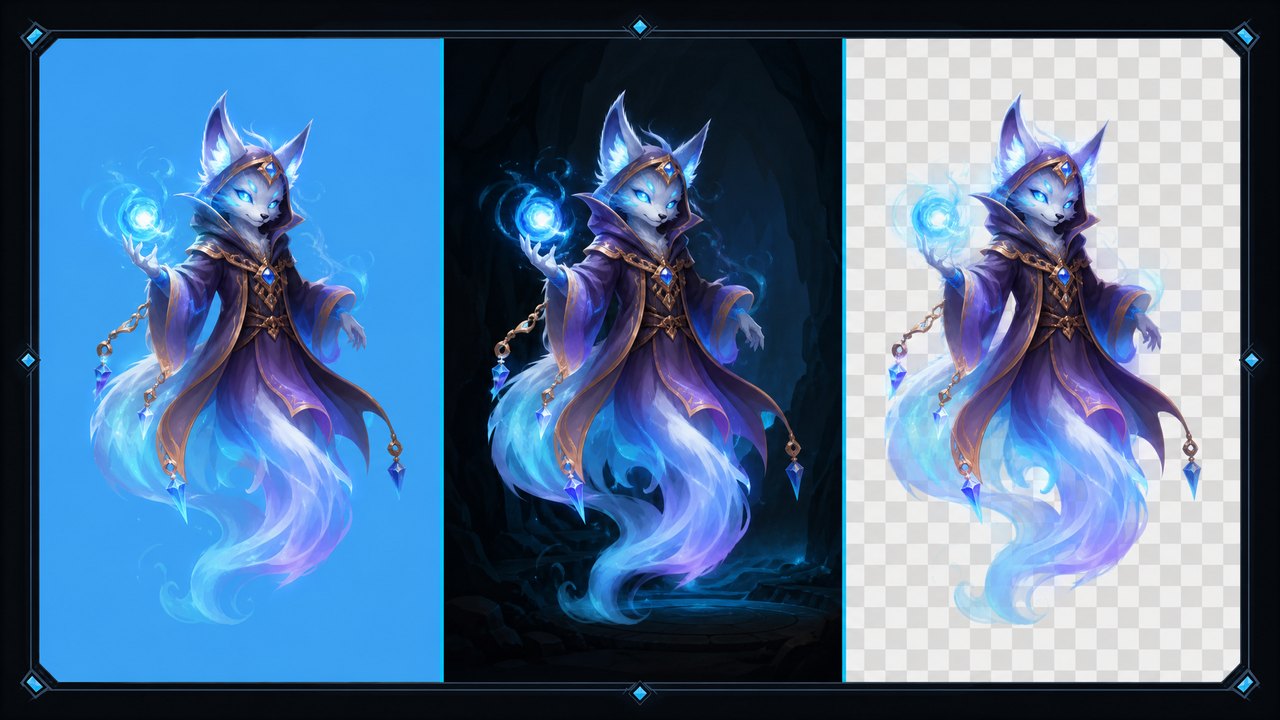
APNG is a PNG that animates. It carries everything PNG does — 24-bit color, a full 8-bit alpha channel — and adds frame timing on top. For modern, soft-edged art it's the clear technical winner over GIF:
- 16.7 million colors instead of 256. No banding, no palette crawl. Your gradients survive.
- 8-bit alpha means 256 levels of transparency per pixel. Those anti-aliased edges render correctly against any background. Drop the character on a blue sky or a dark cave and the edges stay clean. No halo.
Browser support is solid now — Chrome, Firefox, Safari, and Edge all play APNG. The catch is everything that isn't a browser. The big one, and the one that burns people:
Windows File Explorer and the default Photos viewer show only the first frame of an APNG. It looks like a still image. So does Preview on older macOS versions, and plenty of image tools that don't know the format. Your animation is fine — open it in any current browser and it plays — but the person you sent it to double-clicks it, sees one frame, and assumes it's broken. If you're delivering APNG to someone, tell them to open it in a browser, or send them a GIF preview alongside it. Discord, for what it's worth, does play APNG inline.
File-size-wise, APNG is usually smaller than GIF for high-color content (it's not throwing away color data and then dithering to compensate) but can be larger than GIF for simple flat pixel art, where GIF's tiny palette is actually efficient. So the size winner tracks the same line as the quality winner: APNG for rich art, GIF for simple art.
The PNG sprite sheet: what your engine actually wants
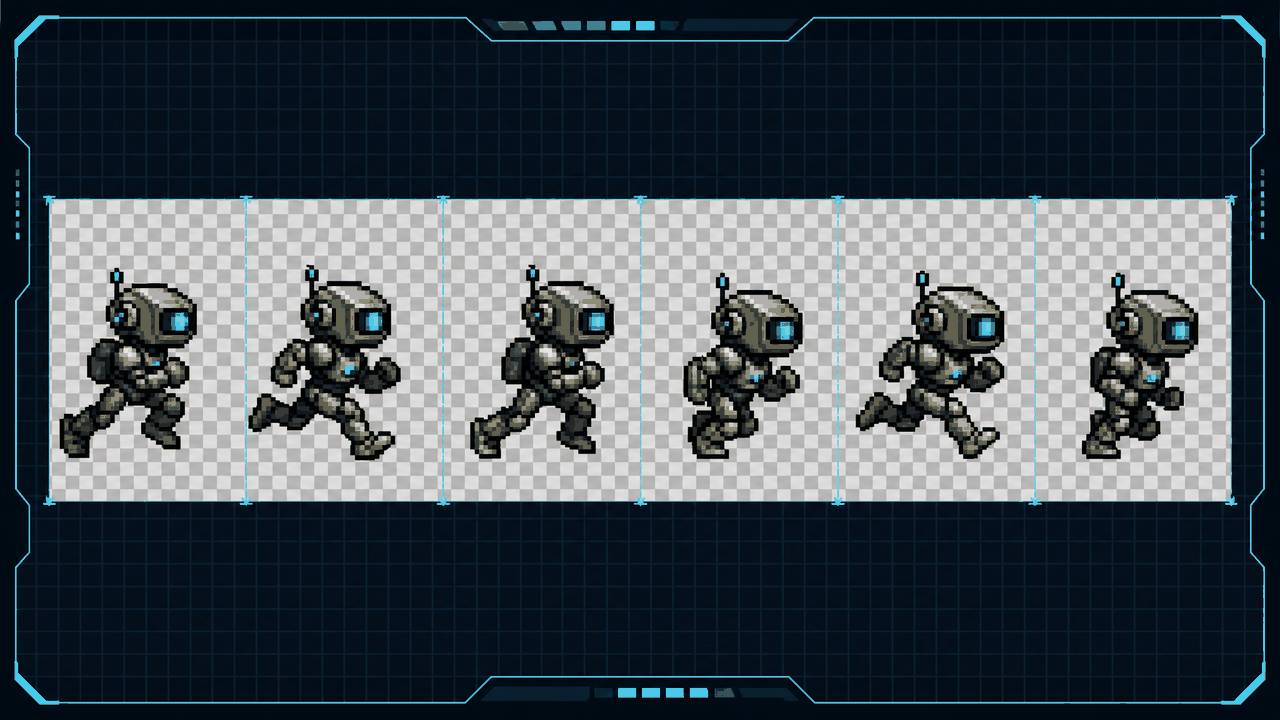
Here's the thing the GIF-vs-APNG debate quietly ignores. If your animation is going into Unity, Godot, GameMaker, a Phaser web game, or basically any real-time engine, you don't ship an animated format at all. You ship the raw frames.
Engines play animation by drawing individual frames at times they control. They need to be able to ask for frame 5, play it at variable speed, pause it, sync it to a hitbox, or blend it with another animation. A GIF or APNG bakes the timing and frame order into the file, which is exactly the control an engine wants to keep. So you give it either:
- A PNG sequence —
run_00.png,run_01.png, and so on. Dead simple, every tool reads it, easy to re-import a single fixed frame. The downside is dozens of small files and dozens of draw calls if you don't pack them. - A sprite sheet — all frames laid out on one big PNG in a grid, with the engine slicing it back into cells. One texture, one load, GPU-friendly. This is the standard delivery format for 2D game animation, and full-color PNG means you keep real alpha for those soft edges, no GIF compromise.
So the real decision tree is: engine? → sprite sheet or PNG sequence. Human preview, soft art? → APNG (with a GIF fallback for convenience). Human preview, pixel art or maximum reach? → GIF.
Where this bites AI-generated video
This whole question got a lot more common because of Veo, Sora, Kling, and Runway. You can now generate a short clip of a creature walking, but a video file isn't a sprite. It's H.264 with no transparency, locked frame timing, and motion blur an engine can't use. To get from that clip to something a game can play, you pull frames out at a chosen FPS, crop the loop, and export them as a PNG sequence or sheet for the engine — or as a GIF/APNG if you just want to show it off.
That extraction step is exactly what a tool like the Sprite Frame Extractor handles: load the video, mark the loop range, set an FPS basis, and export a PNG sequence, a looping GIF, or a looping APNG, all locally in the browser with no upload. If you end up with a sprite sheet instead, the companion slicer chops it back into individual frames. The point is that you choose the output format based on the destination, not the other way around.
Quick reference
- Pixel art, post anywhere, autoplay in chat: GIF. Its limits don't touch you and nothing beats its reach.
- Soft-shaded or AI-generated art, sharing a preview: APNG. Keep the colors and the clean edges — just warn the recipient about the Windows one-frame thing, or include a GIF copy.
- Going into a game engine: PNG sprite sheet (or a PNG sequence). The engine wants the frames, not a baked animation.
Pick the format for where it's going to play. A GIF that bands on a realistic sprite, an APNG someone thinks is broken, or a sprite sheet you can't preview in chat — each one is "wrong" only because it ended up in the wrong place. Match the format to the destination and all three are exactly right.
FAQ
Q. Is APNG better than GIF for game sprites?
For soft-edged, full-color, or AI-generated art, yes — APNG keeps all 16.7 million colors and real 8-bit transparency, so you avoid GIF's banding and jagged edge halos. For pixel art that already lives in a small palette, GIF looks identical, plays everywhere, and is often smaller, so the gap closes. And if the animation is destined for a game engine, neither one is the answer — you want a PNG sprite sheet.
Q. Why does my APNG only show one frame?
Because the viewer doesn't support APNG animation and falls back to the first frame, which is a valid still PNG. Windows File Explorer, the default Photos app, and some older image tools all do this. The file is fine — open it in Chrome, Firefox, Safari, or Edge and it animates. When you send an APNG to someone, tell them to open it in a browser, or include a GIF copy alongside it.
Q. Should I use a GIF or a sprite sheet for my 2D game?
A sprite sheet, almost always. Game engines like Unity, Godot, and GameMaker draw animation frame by frame on their own timing, so they need the raw frames, not a baked GIF or APNG with the timing locked in. Export a PNG sprite sheet (or a PNG sequence) with full alpha. Use GIF or APNG only when a human needs to preview the animation outside the engine, like in a chat or on a store page.
Q. How do I turn an AI-generated video into game sprites?
Pull frames out of the clip. A video file from Veo, Sora, Kling, or Runway has no transparency and locked timing, so you extract individual frames at a chosen FPS, trim to a clean loop, and export them as a PNG sequence or sprite sheet for an engine — or as a GIF/APNG for a preview. A browser tool like the Sprite Frame Extractor does this locally without uploading your video anywhere.